Scene Camera Presets
Per-scene saved viewports — quick-jump locations you can recall during a session.
The Presets tab
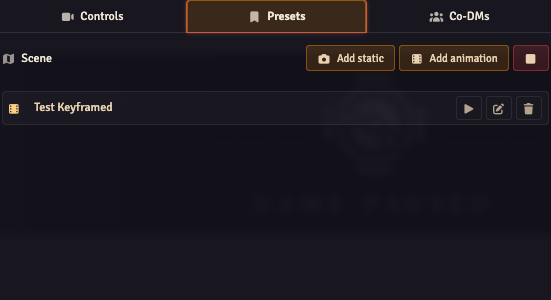
Open the Director and switch to the Presets tab. The header shows the current scene's name; below it, your list of presets for this scene.
Lifecycle
There are two Add buttons in the Presets tab header:
- + Add Static (camera icon) — saves the current viewport as a single-waypoint preset.
- + Add Animation (film icon) — seeds a new keyframed preset and opens it in the keyframe editor.
Per-preset actions:
- Apply (
fa-arrow-right): pans the camera to the preset's position with the configured easing/duration. Animation presets broadcast viafa-playinstead. - Update (
fa-arrow-down-to-bracket): overwrites a static preset's position with the current viewport. Animation presets show a pen-to-square Edit button here instead — there is no Update for keyframed presets. - Delete (trash icon): removes the preset.
- Rename: click the name field and edit inline.
The Stop button in the tab header (red) halts any running preset on all OBS clients by calling broadcastStopPreset.
Each preset in the list shows a kind badge — a film icon for animation presets and a camera icon for static presets — so you can tell them apart at a glance.
Storage
Presets are stored per scene on the scene document's flags, under flags['obs-utils'].cameraPresets. The flag is a JSON string wrapping a versioned object so the schema can evolve. Switching scenes refreshes the Presets tab automatically — no need to reopen the Director.
Static presets have:
- A stable UUID
id. - A
name. x,y(rounded to integer pixels).scale(preserved as a float).
Animation presets carry the same id and name, plus:
keyframes— ordered array of{ time, x, y, scale, easing }objects.loop—'none','restart', or'pingpong'.durationMs— total playback duration in milliseconds.